How to Install Null's Royale on iOS

Null's Royale can be installed on your iOS device, be it an iPhone or iPad. The iOS version is exactly the same as the Android version and the server is the same for all.
If you want to play with a friend who is playing Null's Royale on Android, you can compete with him on your iOS device. Our server is fully adapted for both operating systems and updates are released on the same day.
Installation Method
Here we'll show you how to install the game easily via our website — using a direct link. We'll provide several links that download the app from different servers.
✅ Pros
- Installs in just 2 clicks
- No computer required
- Official version is installed
⚠️ Cons
- The certificate is public and may be revoked
- Installation speed can be slow
Direct Install (iOS)
If one link doesn't work, try again a bit later.
⬇️ InstallStep-by-Step Installation Guide
-
1 Click Install

From your iOS device on this page, click install (choose one of the links; if one doesn't work, click the other).
-
2 Download and open
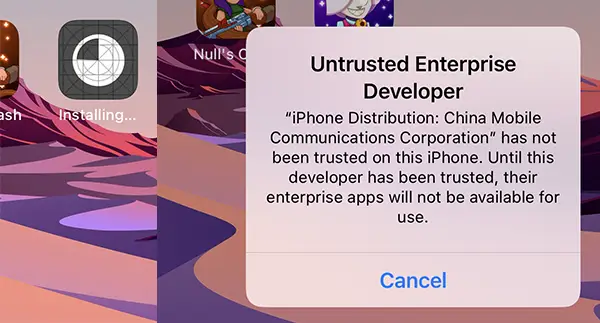
Wait for installation (depends on server load & your connection). On first launch you'll be asked to confirm the developer. Cancel and go to Settings.
-
3 Trust Null's Royale
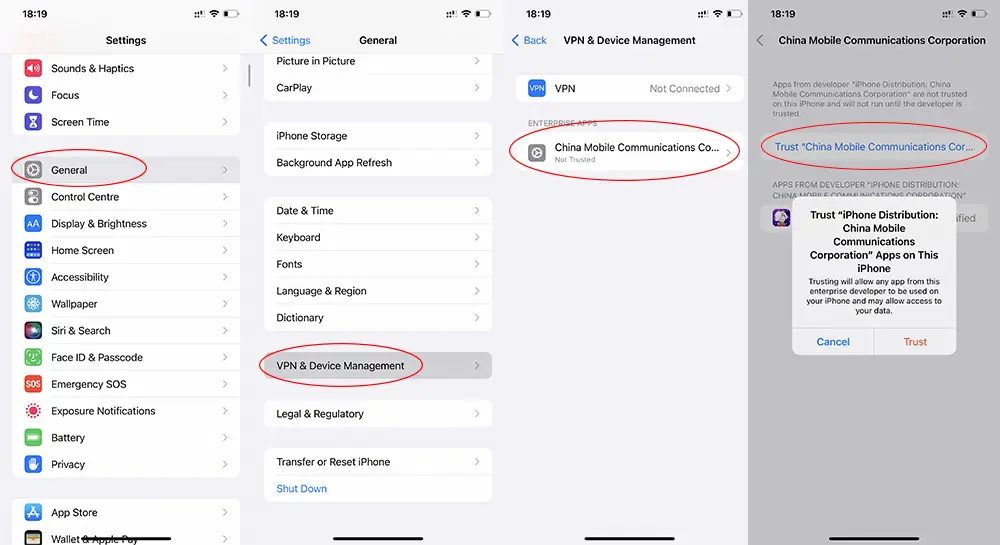
Go to Settings → General → VPN & Device Management, select the untrusted profile and tap Trust.
Alternative Download Options
Multiple ways to get Null's Royale 15.535.13 on your device
Null's Connect — Save Your Account
Analog of Supercell ID for saving your account progress.

-
1
On the home page at the top right, click on the button with three bars.
-
2
Then click on the button "Null's Connect".
-
3
Enter your existing email, which will receive a confirmation code.
-
4
We get the code in the mail and enter it and click on the "PROCEED" button.
-
5
Next, click on "ATTACH CURRENT ACCOUNT".
-
6
Choose your account.
What's Available on the Server?
Constant Updates
Regular updates to the latest version with card balance
All Skins & Emojis
All tower skins and emojis available
New Game Modes
Added to the Disco section
Quick Upgrade
Chests in store to boost your account
150K Cards Chest
Massive chest available in the store
Quick Commands
Fast chat commands available
Server Commands
/help
Request all available commands on the server
/clean
Reset your account to zero
/skin NAME
Choose a skin from modes like crystal fever (gem, pump, gold). Example: /skin gem
/nickname
The nickname will be colored randomly (only for premium users before Feb 9, 2020)
/status
Find out the server state, number of players and other parameters
/helpShow commands
Request all available commands on the server
/cleanReset account
Reset your account to zero
/skin NAMEChange skin
Choose a skin from modes like crystal fever (gem, pump, gold). Example: /skin gem
/nicknameColored nickname
The nickname will be colored randomly (only for premium users before Feb 9, 2020)
/statusServer status
Find out the server state, number of players and other parameters
Null's Royale iOS FAQ
Here you'll find answers to the most common questions about installing and playing Null's Royale on iPhone and iPad.
How do I trust the app certificate on iOS? ⌄
After installing the app, open Settings → General → VPN & Device Management. Select the profile related to Null's Royale and tap Trust.
What should I do if the certificate gets revoked? ⌄
If the certificate is revoked, simply reinstall the app using the latest available download link from our website.
Why is the installation or download speed slow? ⌄
Download speed depends on the selected server and your internet connection. Try switching to Wi-Fi or using a different mirror if the download is slow.
Is the iOS version different from the Android version? ⌄
No. Both iOS and Android versions use the same server, have identical content, and receive updates simultaneously.
Can I play with friends who are using Android? ⌄
Yes. Null's Royale is fully cross-platform, allowing iOS and Android players to battle and play together on the same server.
Do I need a computer to install Null's Royale on iOS? ⌄
No computer is required. The game can be installed directly on your iPhone or iPad using a direct installation link.
Will I get banned for playing on Null's Royale? ⌄
No. Null's Royale is a completely separate private server. Your official Supercell account remains safe and unaffected.
How often does Null's Royale receive updates? ⌄
We update Null's Royale regularly to match the official Clash Royale updates, usually within a few days of the official release.