Null's Royale

Null's Royale — Private Server for iOS & Android

All cards and modes unlocked, unlimited gems and gold, custom content and fast updates. Online battles and clan wars.

🟢 24/7 💎 Unlimited Gems ⌨️ /command *.apk *.ipa
Players Online: 5545
Latest Updated: 31.03.2026
Online
App Icon
Null’s Royale
Version: v14.593.1
⬇️ DOWNLOAD
Total downloads: 19

Why Null's Royale?

🃏

All cards & modes

Get access to all cards, challenges, 2v2 battles, and modified game modes featuring custom cards.

💎

Unlimited resources

Unlimited gems, cards, and gold. Max out your account and try the Unlimited Elixir mode for the ultimate Clash Royale experience.

📱

For iOS & Android

Install via APK or AltStore/Sideloadly. Guides and troubleshooting.

What is Null's Royale  and Why You'll Love It

Null’s Royale is a carefully tuned private server that brings the full Clash Royale experience to your devices. Faster updates, unlimited resources for testing decks, and smooth gameplay — one server, two platforms.

Null's Royale is a custom private server based on the game Clash Royale, created by the Null's Team. The server's development began back in 2016, right after the official game was released by Supercell. Since then, it has introduced many unique features — from custom cards and exclusive characters to a convenient account-saving system known as Null's Connect.

Since 2017, Null's Royale has remained the most popular private Clash Royale server, attracting over 10,000 players every day.

Main features of Null's Royale:

  • Play with any card at max level;
  • Manually upgrade cards — for example, by opening special chests (including a massive chest with 150,000 cards!);
  • Customize your profile with the full collection of emotes, banners, and tower skins;
  • Save your progress with Null's Connect — a system similar to Supercell ID that lets you securely store and restore your account anytime.

Null's Royale offers full multiplayer PvP battles in real time, across all main game modes. It's the perfect place to enjoy Clash Royale without restrictions — no grinding for gold or paywalls. Focus on strategy, build your dream deck, and level up your profile the fun way!

Info Android iOS
Version 14.593.1 14.593.1
Size 1100 MB 1070 MB
Minimum OS 7+ 13+
Price Free Free
Server Version 2.16.3
Updated 31.03.2026
Players Online 5545
iOS Android

Clash Royale vs. Null's Royale — What's the Difference?

How does the original Clash Royale differ from the private server Null's Royale? The universe is the same, but the progression system is completely different.

In the official game, you complete quests, take part in seasonal events, buy battle passes, and spend a lot of time (and money) to upgrade your cards and build your collection. Unlocking all cards and maxing them out can take years.

On Null's Royale, things are much simpler. Here you get:

  • Unlimited gems and gold;
  • A shop with unique chests that instantly unlock all cards, max them out, and add all skins, emotes, and evolutions;
  • Full multiplayer battles 24/7 across all main game modes.

The key difference is that you immediately get access to all content: play with any card at max level, customize your unique profile, and enjoy the game without restrictions.

Feature Clash Royale Null's Royale
Price ✅ Free ✅ Free
Resources ❌ Limited ✅ Unlimited
Server ✅ Official Multiplayer ✅ Custom Multiplayer
Champions / Heroes ❌ Long progression ✅ Max progression
Evolutions ❌ Scarcity of Wild Shards ✅ Unlimited Wild Shards
Pass Royale ❌ $8.49 / $16.99 ✅ Fully unlocked
Multiplayer ✅ 24/7 ✅ 24/7
Tower Skins ≈20+ 135
Emotes ≈70+ 558
Banners ≈29+ 489

Common ERRORS in Null’s Royale

Typical issues during installation and launch, and how to fix them quickly.

75%

🔄 Stuck at 75%

The game gets stuck at 75% during loading, usually because the ISP blocks the server IP.

How to fix:

  • Clear the app cache and relaunch;
  • Reinstall using the latest version from our website;
  • Try mobile data or a VPN instead of Wi-Fi.

❌ Crash on Launch (iOS)


Often happens after manual install via Sideloadly/AltStore. Such builds work ~7 days and require re-signing.

Tip: Use Wi-Fi–based install so the app re-signs automatically when your PC is on and the device is connected.

📦 Error 1001


Appears during install and usually means a corrupted file.

Solution:

  • Delete the broken file;
  • Download the latest build from the official site and install again.

🔄 Stuck on “Updating…”

0%

Most content (cards/graphics/emotes) streams from the server. Under heavy load the update screen may hang.

What to do:

  • Fully close and restart the game;
  • Switch connection (mobile/VPN);
  • Wait a few minutes and try again.

Connection lost

Unable to connect with the server. Check your internet connection and try again.

Try again

🚫 “Connection Lost”

Classic network issue caused by an unstable connection.

How to fix:

  • Check stability, restart router or switch networks;
  • If others apps work fine, contact us via the feedback form.

Didn’t find your error? Tell us via the feedback form — we’ll help.

Null’s Royale Amazing Modes

Exclusive modes that are not available in the official game. Test your skills in unique conditions.

🥇

Ranked

Competitive 1v1 mode for players above 5,000 trophies. Earn ranked points to climb leagues and unlock exclusive rewards.

👥

Classic 2v2

Team up with a friend or random player for co-op battles. No trophies at stake — just fun and practice!

♾️

Infinite 1v1

Endless 1v1 battles with Infinite Elixir. Cards cycle non-stop for wild, nonstop action and testing new decks.

🎯

Classic Challenge

Entry: 10 Gems. Win up to 12 matches before 3 losses. Competitive but low-risk way to earn rewards.

🏆

Grand Challenge

Entry: 100 Gems. Hardcore version of Classic Challenge with higher rewards. Reach 12 wins to maximize prizes.

🔄

Mega Draft Challenge

Entry: 50 Gems. Players draft cards turn by turn before battle. Strategic, skill-based mode with big rewards.

Commands on Server

Useful commands to customize your game experience. Enter them in the in-game chat.

List of available commands:
/clean · Reset account
/help · Show available commands
/skin (Skin) · Change tower skin (legacy)
/status · Show current server status

On Null’s Royale servers, you can use a set of commands to manage your account and check server information.

Command Description
/clean Delete all cards and reset account progression. Clan and trophies remain unchanged.
/status View server information (uptime, online players, etc.).
/nickname Change your nickname color randomly (only available for premium before Feb 9, 2020).

Existing Commands (but not for everyone):

/premium uR6rKU3KNOuacqimhqL

When we first launched the Null’s Royale server, premium access was available for purchase. Players with premium received special features like a colored nickname — and that’s why this command exists. It allows access to a rare feature: manually adding trophies.

Currently, premium is no longer available for purchase.

However, there are exceptions: if you have the opportunity to showcase Null’s Royale to a large audience (for example, on YouTube or other social media platforms), feel free to contact us via the feedback form.

At the moment, commands are informational only, since account upgrades and progress have been moved to the in-game shop.

In the Shop you can now find:

  • Unlock All Cards
  • Unlock Arena Cards
  • Upgrade All Cards

Additionally, you can instantly unlock premium banners using the auction item “Get All Banners Instantly!”.

On all servers you can use the /help command to get a full list of available options.

How to Install on iOS?

Step-by-step guide for iPhone and iPad. No jailbreak required.

App Icon

Install Null's Royale on your iPhone or iPad in just a few taps. Direct installation from our website — no computer required!

Quick 2-click install
📱 No PC needed
🔄 Latest version
Latest: 14.593.1 Updated: 31.03.2026

How to Install on Android?

Quick installation guide for Android devices. Allow installation from unknown sources.

App Icon

Installing the Android version is straightforward: download the APK and install it on your device. If the system asks for permission to install apps from unknown sources — enable it once and proceed.

✅ Pros

  • Fast direct APK install
  • No PC or extra tools needed
  • Works on most Android 7+ devices

⚠️ Cons

  • “Unknown sources” permission required
  • Google Play Protect may warn (safe to proceed)
Latest version: Updated: —

Direct Install (APK)

If the first link is slow or blocked, try again later.

⬇️ Download APK
Android 7+ recommended
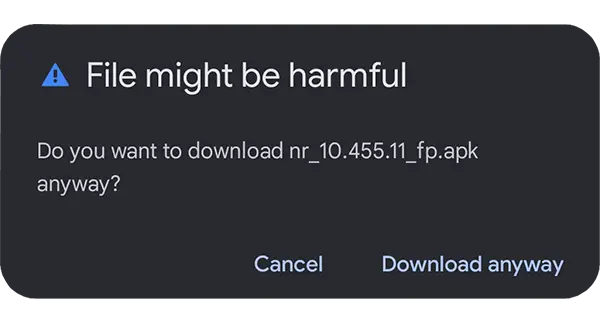
  1. 1 Download the APK
    Click on the download anyway
  2. 2 Allow installation from this source
    unknown sources
    When prompted, enable Install unknown apps (Allow from this source). You can turn it off later.
  3. 3 Install & Open
    install apk
    Tap Install, then Open. If Play Protect shows a warning, choose Install anyway — the file is clean.

Null's Royale — Questions & Answers

Common questions about installation, security, and updates. This section is open for indexing: all text is visible.

Where can I download Null's Royale?

Use the buttons in the Direct Install (APK/iOS) section above. If one link is overloaded or blocked by your ISP, try the alternative button. We provide multiple mirrors.

Is it safe? Will my Supercell account be banned?

Null's Royale is a separate private server, not connected to official Supercell servers. We recommend not using your main Supercell ID and playing on a separate device/profile. Your progress from official servers does not transfer.

iOS: the app didn't install / profile not trusted

Try installing again using the second button. If iOS shows an untrusted developer dialog on launch, go to Settings → General → VPN & Device Management and tap Trust on the profile. Detailed steps are in the Instruction section.

Android warns "File might be harmful"

This is a standard warning for APKs from outside Google Play. Tap Download anyway, then allow Install unknown apps for your browser/downloader. You can disable this permission later. Details in Instruction section.

How do updates work?

We publish new versions in the same installation section. Usually you need to download a new build. We show the version number and update date on the card.

Is multiplayer 24/7? Ping and regions

The server runs 24/7. Latency depends on your ISP and region. If ping is high, try a different mirror/DNS or mobile network.

Common errors and quick fixes
  • Stuck on "Connecting…" — restart the game, check internet/VPN, switch mirror.
  • "App Not Installed" (Android) — remove old build, clear Package Installer cache, reinstall.
  • Cannot verify developer (iOS) — open VPN & Device Management again and tap Trust.
Null’s Royale is a fan project. We are not affiliated with or endorsed by Supercell. All trademarks and game content belong to Supercell.